Blog
My running data, on my own Mac
A Garmin key, no server, and Apple Intelligence calling my padel match tennis.
Like every developer who hit a certain age, I started running. And like every developer, I got more interested in the data than was probably healthy.
My watch records everything: every run and lap, heart rate through the night, how I slept, how recovered I supposedly am. Years of it. But I could only look at it the way Garmin Connect shows it, one activity at a time, and that never answered what I wanted to know. Is my HRV low this week, or only compared with last week? Do I sleep worse after a hard evening session? Did I fade on Tuesday's tempo?
The apps that can answer those want me to sign up, pay every month and upload my sleep to their servers. I wanted the data on my own disk, with something on my Mac to draw it. So I built it, and called it Splits.
A key only you can create
What made it possible is Garmin's Personal API. You create a key in your Garmin Connect account, and that key can read your own data. You don't have to apply for anything.
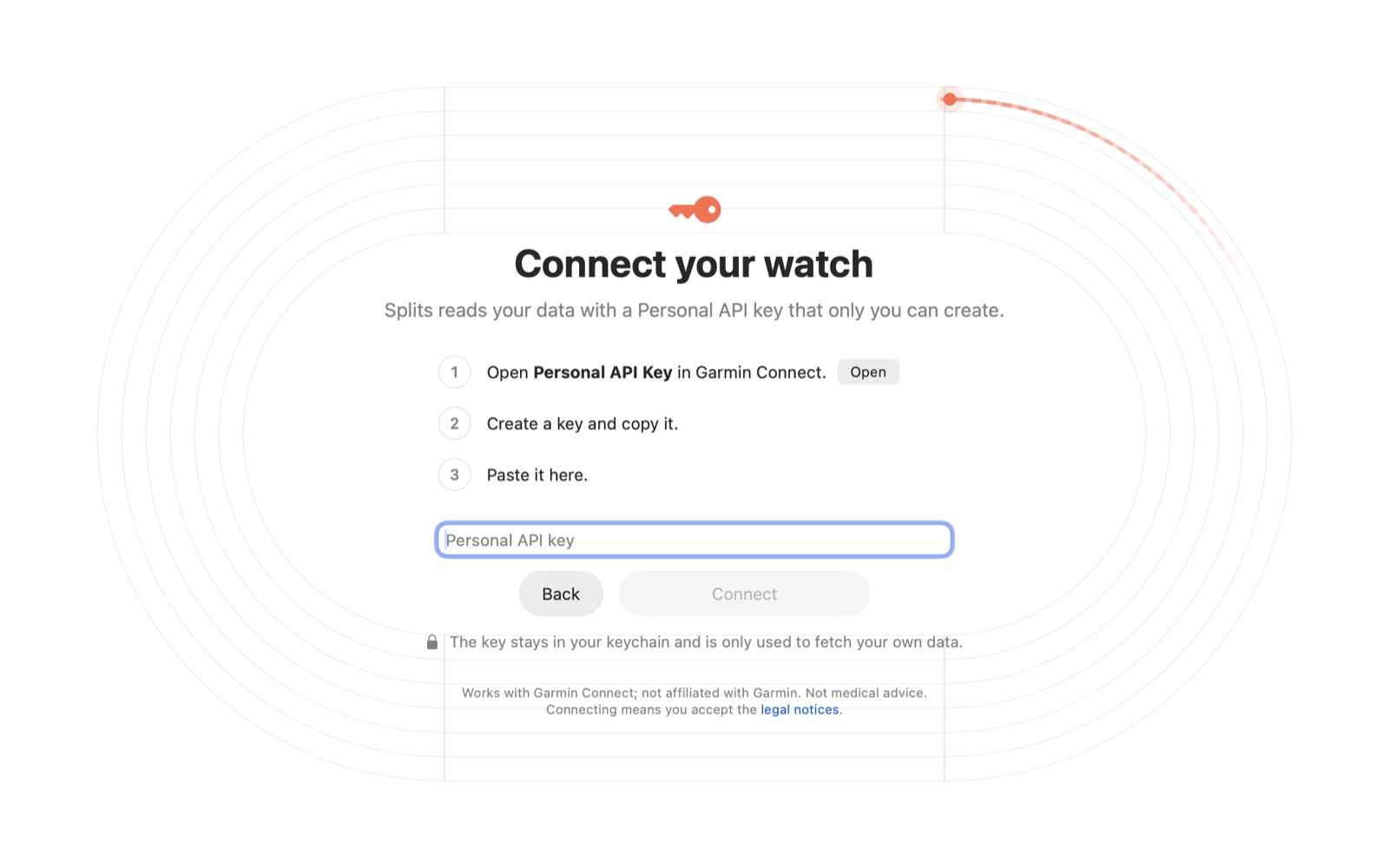
One request swaps the key for a token. The token comes back as plain text, not JSON, and lasts 24 hours.
curl -X POST -H "Authorization: ApiKey $KEY" \
  https://personal.connectapi.garmin.com/personalapitoken-service/personal-api/personal-api-key/token
From there you get activities, daily summaries, sleep, HRV (a reading every five minutes through the night), heart rate through the day, and the original FIT file of every activity, which has the route and every lap. The documentation is thin, the rate limits aren't published, and padel is called paddelball. A first sync of about 2,000 activities and a year of daily data still takes only around thirty seconds.
Drawing it
HRV is compared the way sports scientists do it: a 7-day average against a normal range built from your own previous 60 days (Plews and colleagues). That way a single bad night doesn't set off alarms. Sleep debt is counted over 14 nights against what your watch says you needed. Records come from the FIT files, so the best 5K hiding inside a long run counts too.
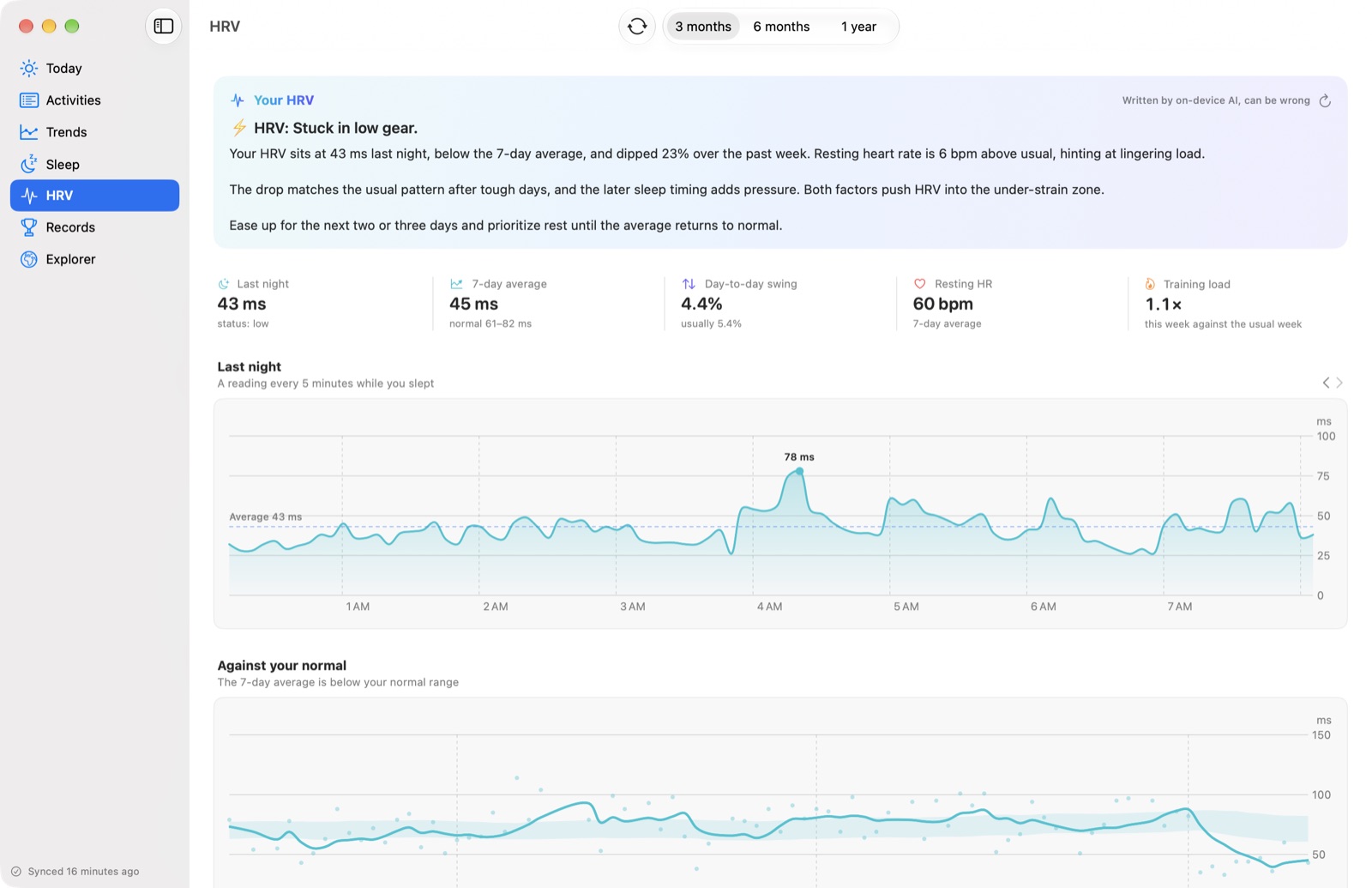
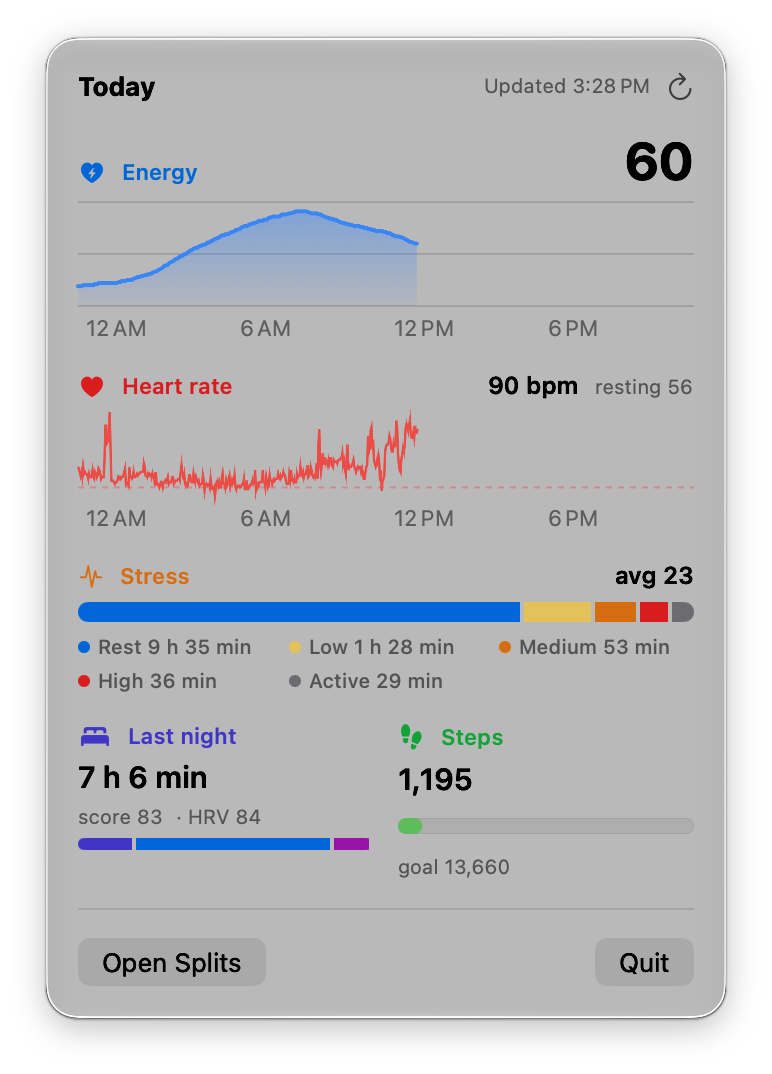
Today lives in the menu bar too. One click shows the day so far, live: energy and heart rate since you woke up, stress, steps. It's fetched when you open it and every fifteen minutes, and never stored. Most mornings that's all I open.
The fun part
The part I didn't need and enjoy the most is the Explorer. Every outdoor activity's start point is matched to a country and a city, offline, using Natural Earth's borders and GeoNames' list of cities. No location ever goes to a geocoding service. Then it draws the map: every country you've run in, joined in the order you crossed into them, with a count per year.
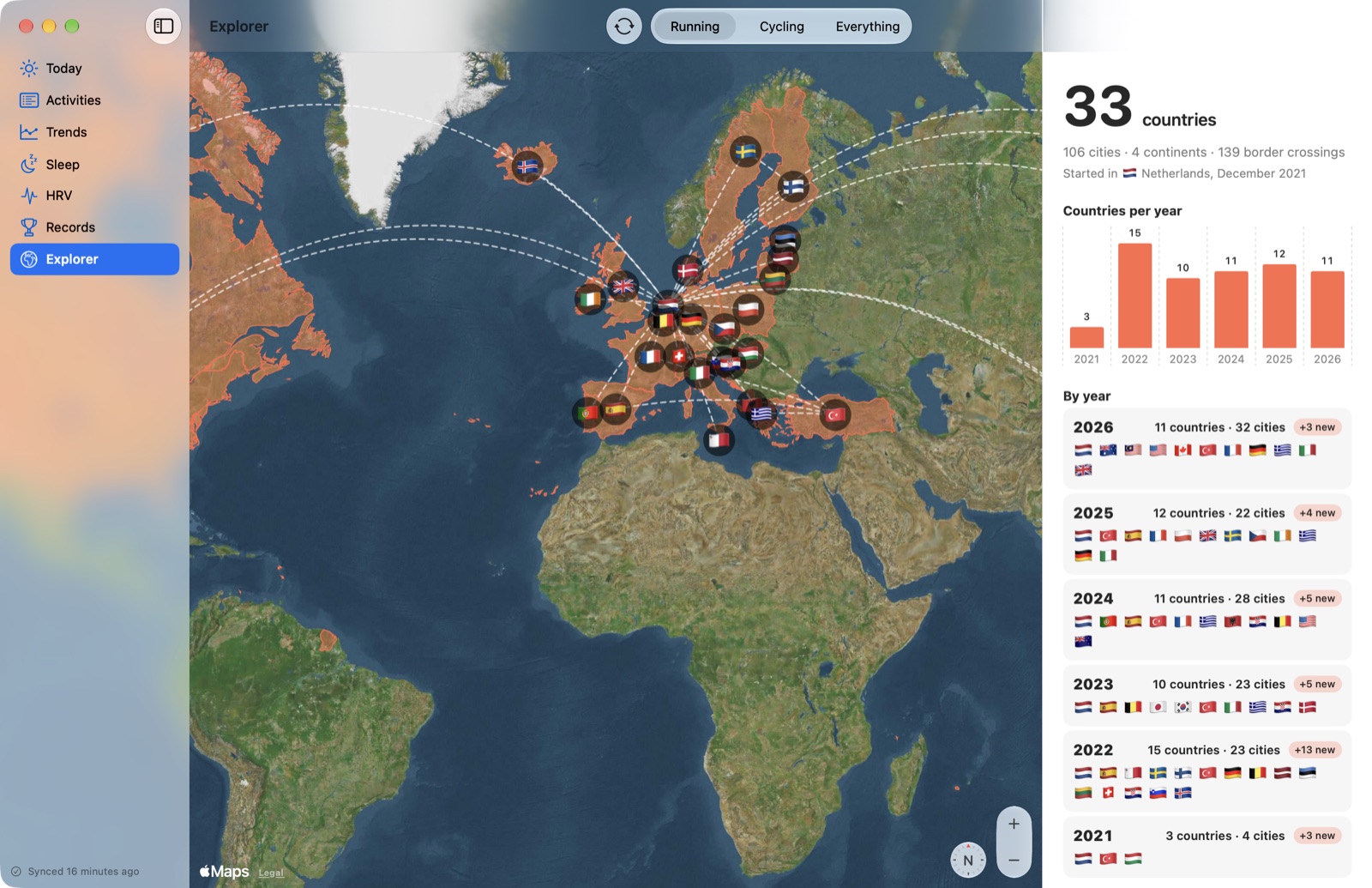
Apparently I've run in 33 countries. I didn't know that until Splits counted them.
Apple Intelligence
Then macOS 26 shipped Apple's Foundation Models framework, which lets any app use the language model behind Apple Intelligence. It's the on-device model, around 3 billion parameters, so the data stays on the Mac and there's no cost per call. For this app that was an easy yes. I wanted a short note under each run, like a running friend looking at your watch.
The API is pleasantly small. You check SystemLanguageModel.default.availability (the Mac might not support it, Apple Intelligence might be off, or the model might still be downloading), create a LanguageModelSession with your instructions, and stream the response. On my Mac a 55-word note takes about six seconds. I only use the on-device model, never Private Cloud Compute.
My first version gave it the whole workout and asked for a take. The notes read well, and a lot of them were wrong. With zone 4 at 0%, it said I'd run "mostly in zones 1 to 4". It called my padel match tennis, then pickleball. I asked it not to use em dashes, and it used em dashes. On the HRV page it once put a cheerful "High HRV" headline above a verdict that said the opposite.
To be fair, it's a small model. It writes nicely, but it can't be trusted with numbers. So I stopped asking it to read them. Now ordinary code makes every decision and writes it down as a sentence, and Apple Intelligence just says it again in a friendlier voice. This is what it gets for that Tuesday tempo:
Distance: 8.02 km
Average pace: 5:54 /km
Pacing judgement: a structured workout, 2 reps with easier running before, between or after them,
  so the changes in pace were planned. The reps averaged 5:28 /km, 5:56 /km: the last rep was
  29 s/km slower than the first, so it faded.
Effort compared with usual: 44 s/km faster than their usual pace, at their usual heart rate.
Heart rate zones judgement: a moderate effort, mostly zones 2 and 3 (86% of the time).
Suggestion for what's next: A solid workout: an easy day next lets it sink in.
The sport is running. Call it exactly that.
Zones go in as a verdict, since it kept misreading the percentages. Whether tomorrow should be easy is decided by an if statement in my code. The last line is there because of padel. I also keep the numbers to a minimum, because it copies every number it sees. The em dashes I gave up on and strip with a regex.
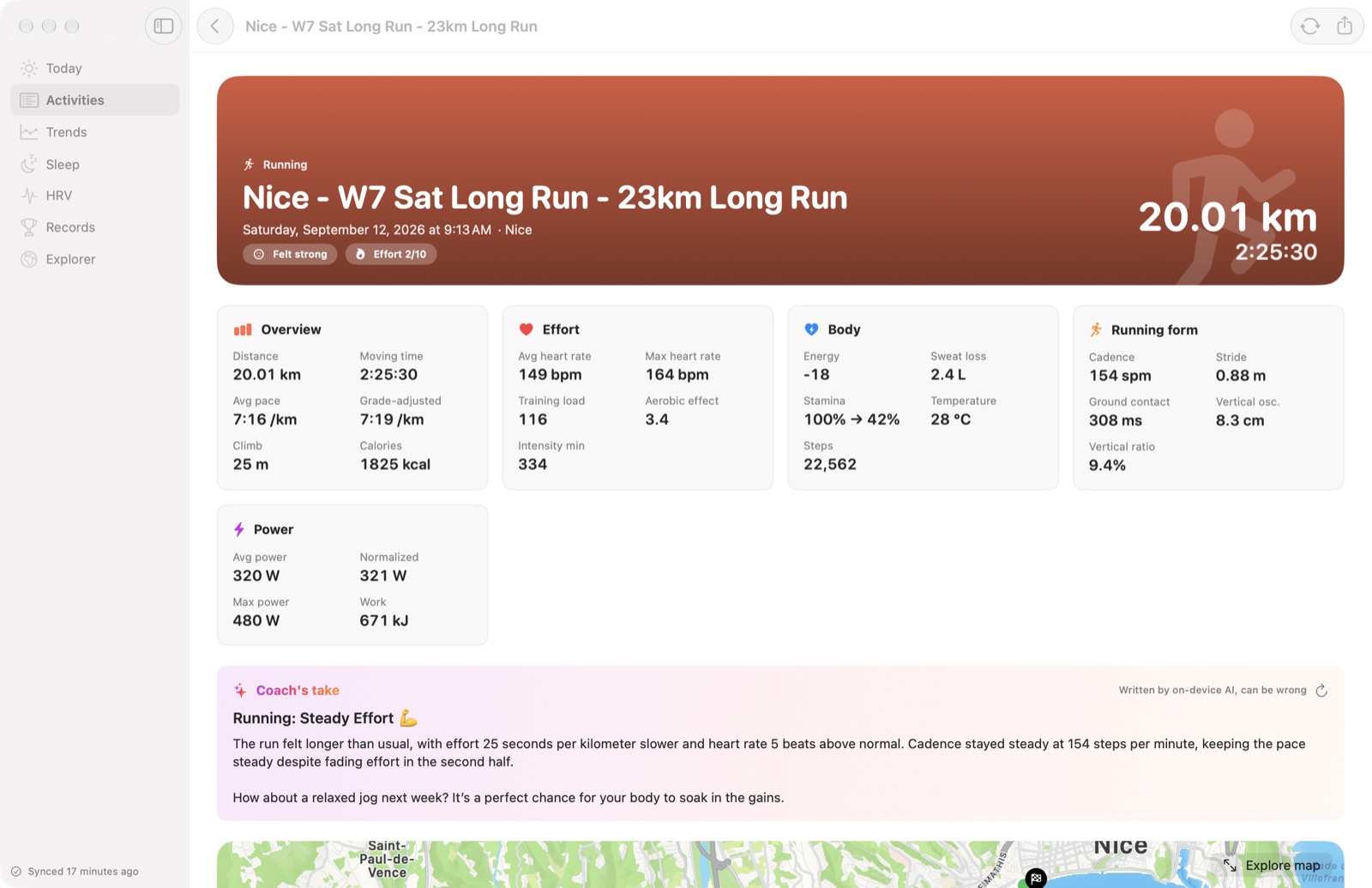
A nice side effect is that mistakes now end up in my code, where I can test them. An early note complained about "71 s/km swings" on that same tempo. The model hadn't made it up. My code had compared every kilometre, warm-up included, and called a planned workout uneven. I fixed it to find the reps in the watch's laps, and that run is now a unit test.
It still slips. From the facts above it wrote that my "pacing shifted smoothly", when the code said I faded. So every note says "written by on-device AI, can be wrong" and sits next to the charts it talks about. I still like reading them in the morning. I just don't let it do the maths.
This week
I put Splits on GitHub and Reddit a few days ago. Soon two people sent screenshots of the same error: for a stretch with no HRV, Garmin answers 204 No Content with no body, and my first sync stopped there. I fixed it, wrote tests that fail exactly like their screenshots, and shipped 0.1.1 the same day. I enjoyed that more than I expected.
If you want to try it, it's free.

Splits
Free and open source (MIT), for macOS 14 and later. The notes need macOS 26 with Apple Intelligence. No account, and I never see your data.
Splits is an independent app, not made or endorsed by Garmin. Garmin and Garmin Connect are trademarks of Garmin Ltd. or its subsidiaries. Nothing in Splits is medical advice.